
PocketCaddie ProductiOS & Android

AI golf caddie that knows your swing

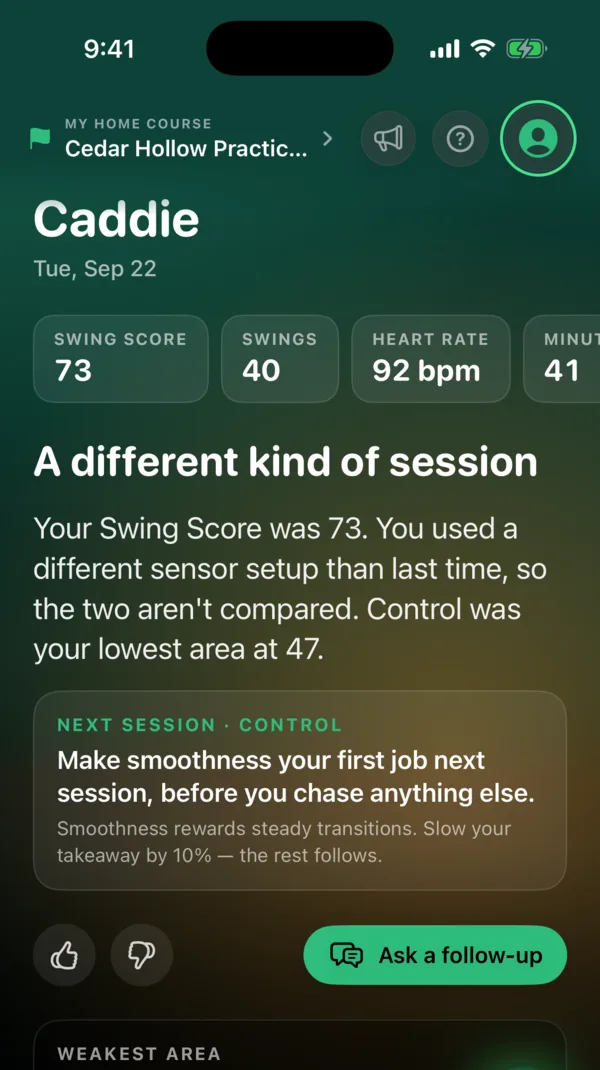
AI Caddie is PocketCaddie’s coaching chat. It knows your swing history, so its answers come from your own sessions, not generic tips.

When you finish a range session, your caddie tells you what moved and the one thing to work on next. Then ask it anything about your swing or your practice. Available on iOS and Android.

Download on the App StoreGet it on Google Play
One of three home tabs · Practice · Progress · Caddie

Watch your AI Caddie write your note—then ask it anything.

The Caddie tab is one of PocketCaddie’s three home screens. Switch between the Caddie Home Tab (Live Note Reveal) and Live AI Caddie Chat below, or step across 120, 540, and 1,080 swings to see how its coaching evolves.

Home tab 3 of 3 · Caddie

Caddie

Today · Tue, Oct 20 · Los Verdes Range

Last sessionToday
Total swings120 swings
Swing Score74 +5

Your transition settled in after swing 14.

You started the bucket rushing from the top at 2.4:1, then found your 3.0:1 rhythm over the final 24 balls. When your pelvis starts down before your hands, your Wrist Action score jumps from 64 to 86 and your hand path stays inside the slot.

NEXT SESSION · SEQUENCEStart your next bucket with 8 half-speed Step Drills before hitting full 7-irons.Linked 3D Drill: Step Drill Sequence (P4 → P5 transition)
Sequence88 / 100+9 vs 3-session avg
Tempo Ratio3.0 : 1Locked in last 24 swings
Hand Speed20.8 mphConsistent ±0.4 mph
Streaming word-by-word… (click card to finish)
The 100 to 1,000+ Swings Story

How 1,000 swings teaches PocketCaddie to know your swing from just the phone in your pocket.

Every bucket on the range and every shot in Live Round compounds into your Personal Swing Fingerprint.

Stage 01 · First Bucket15–50 Swings

Your Baseline Swing Score & Wrapped

In a single range session of 15+ swings, the patent-pending no-video swing engine establishes your 0–100 Swing Score across 6 categories, measures your natural tempo ratio, and highlights one clear focus skill in Session Wrapped.

  • 0–100 Session Swing Score
  • Session Wrapped Recap
  • First Post-Session Caddie Note
  • Linked 3D X-Ray Drill
Stage 02 · Motion DNA100+ Swings

Multi-Club Baseline & Virtual Club Fitting

At 100+ labeled swings, the engine separates single-session noise from your true biomechanical tendencies. It unlocks Virtual Club Fitting from your real practice swings and tracks how your transition changes from wedge to driver.

  • PocketCaddie Fitting Lab Unlocked
  • Club-by-Club Tempo & Speed Profile
  • Multi-Session Skill Trendlines
  • AI Caddie Practice Plan Builder
Stage 03 · Range + Course500+ Swings

Connecting Range Mechanics to On-Course Shots

As you log rounds in Live Round 3D alongside range buckets, AI Caddie compares your relaxed range swing against your under-pressure course swing—spotting exactly what changes on a narrow par-4 tee or an uphill approach.

  • Range vs. Course Swing Comparison
  • Plays-Like & My Bag Carry Calibration
  • Hole-by-Hole Pressure Diagnostics
  • Automatic Fitting Delta Updates
Stage 04 · Personal Swing Fingerprint1,000+ Swings

Knows Your Swing From Just the Phone in Your Pocket

After 1,000+ swings across the range and the course, PocketCaddie has learned how your pelvis rotation, hip tilt, and impact braking couple with your upper body and club delivery. Even when you head out with just your phone in your front pocket, your Personal Swing Fingerprint recognizes your full swing signature.

  • Personal Swing Fingerprint Calibrated
  • High-Context Coaching From Phone-in-Pocket Alone
  • Instant Fault Detection From Pelvis Signature
  • Ready for PR1 Ball-Flight Keystone Fusion
Why It’s Different

A caddie that has read every swing.

Ask anything, as often as you like. Every answer is grounded in your recorded data, and after every session the caddie leaves a short note: how it went, what moved, and what to work on next time.

A general chatbot

Only knows what you type. Guesses from a description of a swing it never measured.

Your caddie

Reads the measurements available for your setup, your sessions, your bag and your trend, and answers from that.

It can draft practice plans and goals; you approve them before they save.

AI Caddie session note
Continue Exploring

More in the PocketCaddie platform.

01100-Swing Lab · iOS

Virtual Club Fitting Lab

7-slide Fitting Lab reveal & full Driver/Iron spec sheet derived from 100+ real range swings.

Open product page →
02New in 6.9

3D Drills & Muscle Anatomy

48 3D x-ray drills across all 17 skills, with step stops, fault ghosts, and muscle activation.

Open product page →
03iOS

Live Round 3D & Range View

6,300+ LiDAR 3D courses and 2,200+ driving ranges with Plays-like elevation and 18-hole flyovers.

Open product page →
04iOS · Apple Watch

Interactive 3D Swing Replay

Spin your Apple Watch hand path 360° in 3D on a stature-calibrated golfer at 1×, ½×, or ¼× speed.

Open product page →
05iOS & Android

No-Video Swing Engine & Score

Phone, Watch, and AirPods motion sensing. 0–100 session Swing Score, 17 skills, and Wrapped.

Open product page →
06In Development

Pocket Radar 1 (PR1)

The $100 screenless launch monitor keystone. Your watch is the screen. Your pocket is the brain.

Open product page →
07iOS · watchOS

Apple Watch golf swing tracker

Wear Apple Watch on your lead wrist and PocketCaddie adds wrist-motion measurements to your range sessions, plus club fitting and 3D replay on iOS.

Open product page →
08iOS

Track your head stability with AirPods

On supported iOS setups, compatible AirPods add head-motion measurements to your PocketCaddie range sessions: how steady your head stays through impact.

Open product page →
09iOS

Golf handicap tracker

Play rounds with Live Round on iOS and PocketCaddie keeps a handicap estimate from your scores, next to your Swing Score from the range.

Open product page →